Dashboard Alert Feature - User Guide
📋 What is Dashboard Alert?
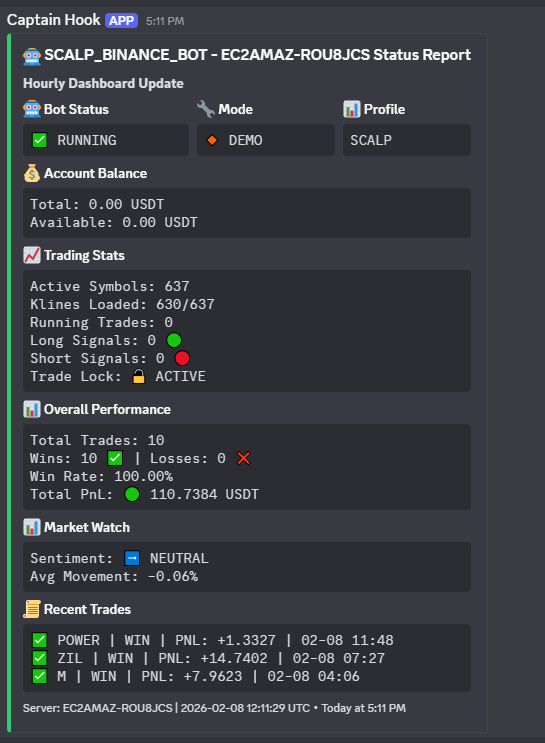
Dashboard Alert is an automated notification system that sends you regular updates about your trading bot's performance directly to your Discord or Telegram. Think of it as a "health check" message from your bot, letting you know everything is running smoothly and keeping you informed about your trades.
🎯 Why Use Dashboard Alerts?
✅ Stay Informed - Get regular updates without logging into your server
✅ Remote Monitoring - Check your bot's status from anywhere, anytime
✅ Peace of Mind - Know your bot is actively trading and healthy
✅ Quick Overview - See your performance at a glance
✅ Mobile Friendly - Monitor from your phone via Discord/Telegram app
📱 What Information Do You Receive?
Each alert includes:
🤖 Bot Health Status
- Is the bot running properly?
- What mode is it in (Production or Demo)?
- How many trading pairs is it monitoring?
- Are there any trading locks due to volatility?
💰 Account Overview
- Your total balance
- Available funds for trading
- Currency (USDT, BUSD, etc.)
📊 Performance Summary
- Total number of trades completed
- Win/Loss breakdown
- Win rate percentage
- Total profit or loss (PnL)
- Average profit per trade
🔥 Active Trades (Current Positions)
Shows your top 5 open trades with:
- Symbol name (BTC, ETH, etc.)
- Number of orders (if using DCA strategy)
- Entry price
- Current price
- Unrealized profit/loss (color coded: 🟢 profit, 🔴 loss)
📜 Recent Activity
Your last 3 completed trades showing:
- Symbol traded
- Result (✅ WIN, ❌ LOSS, ⚪ VOID)
- Profit or loss amount
- When it closed
📈 Market Conditions
- Overall market sentiment (Bullish, Positive, Neutral, Negative, Bearish)
- Average market movement percentage
- Helps you understand if it's a good or bad trading day
⏰ How Often Do You Get Alerts?
Every 1 hour - You'll receive an update once per hour showing your bot's current status.
This frequency is perfect because:
- Not too frequent to be annoying
- Often enough to catch issues quickly
- Gives you a regular heartbeat from your bot
🚀 How to Set It Up
Step 1: Choose Your Platform
You can receive alerts on:
- Discord - Great for desktop monitoring
- Telegram - Perfect for mobile notifications
- Both - Get alerts on all platforms
Step 2: Discord Setup (Optional)
- Open your Discord server
- Go to Server Settings → Integrations
- Create a new Webhook
- Copy the Webhook URL
- Paste it into your bot's configuration file
Step 3: Telegram Setup (Optional)
- Open Telegram and search for @BotFather
- Create a new bot and get your Bot Token
- Search for @userinfobot to get your Chat ID
- Add both to your bot's configuration file
Step 4: Start Your Bot
Once configured, the dashboard alerts will automatically start sending hourly updates!
📱 What Does an Alert Look Like?
Discord Example
You'll see a rich, color-coded message card with:
- Green status if everything is running well
- Yellow/Orange if bot is initializing
- Organized sections for easy reading
- Emoji icons for quick visual scanning
Telegram Example
You'll receive a formatted text message with:
- Clear section headers
- Emoji indicators for status
- Easy-to-read layout
- Timestamp of the update
Both formats show the same information, just styled for their respective platforms.
🎨 Understanding the Alert
Status Indicators
Bot Status:
- ✅ RUNNING - Everything is working perfectly
- ⏳ INITIALIZING - Bot is starting up
Trading Mode:
- 🔴 PRODUCTION - Real money trading
- 🔸 DEMO - Practice mode (no real trades)
Trade Lock:
- 🔓 ACTIVE - Bot is trading normally
- 🔒 LOCKED - Paused due to high market volatility (safety feature)
PnL Colors
Profit/Loss Display:
- 🟢 Green = Positive (making money!)
- 🔴 Red = Negative (losing money)
- ⚪ White = Neutral (break-even)
💡 Pro Tips
Tip 1: Set Up a Dedicated Channel
Create a separate Discord channel or Telegram chat just for bot alerts to keep them organized.
Tip 2: Check Alerts Daily
Make it a habit to review your daily alerts. Look for:
- Consistent profits
- Win rate trends
- Number of active trades
Tip 3: Watch Market Sentiment
If market sentiment is "BEARISH" or "NEGATIVE", expect fewer trades or lower profits - this is normal!
Tip 4: Monitor Active Trades
Keep an eye on how many trades are running. Too many might mean high exposure, too few might mean missed opportunities.
Tip 5: Use Multiple Devices
Set up both Discord (desktop) and Telegram (mobile) so you can check from anywhere.
❓ Common Questions
Q: Can I change how often I get alerts?
A: Yes! Your bot administrator can adjust the interval from 30 minutes to several hours.
Q: Will I get alerts if the bot stops working?
A: If the bot crashes, alerts will stop. No alert = potential issue. This is actually a useful indicator!
Q: Do alerts work in demo mode?
A: By default, no - to avoid spam during testing. This can be enabled if needed.
Q: Can multiple people receive the same alerts?
A: Yes! Everyone in your Discord channel or Telegram chat will see the updates.
Q: What if I'm getting too many notifications?
A: You can:
- Mute the Discord channel/Telegram chat
- Adjust notification settings on your device
- Ask to increase the alert interval to 2-4 hours
Q: Is my account information safe?
A: Alerts show balances and trades but never show API keys, passwords, or other sensitive credentials.
🎯 What to Watch For
Good Signs ✅
- Consistent hourly alerts arriving
- Win rate above 50%
- Positive total PnL (green)
- Multiple active trades
- Positive or neutral market sentiment
Warning Signs ⚠️
- Alerts stop coming (bot might be down)
- Win rate dropping significantly
- Large red PnL numbers
- Trade lock activated frequently
- Very bearish market sentiment
When to Take Action
- No alerts for 2+ hours → Check if bot is running
- Win rate below 40% → Review trading strategy
- Large losses → Consider reducing trade size
- Constantly locked → Market too volatile, wait for calmer conditions
📊 Example Scenarios
Scenario 1: Healthy Trading Day
Status: ✅ RUNNING
Active Trades: 15
Win Rate: 68%
Total PnL: 🟢 +$156.78
Market: 📈 POSITIVE

Action: Keep monitoring, everything looks good!
Scenario 2: Slow Trading Day
Status: ✅ RUNNING
Active Trades: 3
Win Rate: 52%
Total PnL: 🟢 +$12.34
Market: ➡️ NEUTRAL

Action: Normal for neutral markets, be patient.
Scenario 3: Rough Market
Status: ✅ RUNNING
Active Trades: 8
Win Rate: 45%
Total PnL: 🔴 -$23.45
Market: 💥 BEARISH

Action: Consider pausing bot or reducing trade size.
Scenario 4: Bot Issue
No alert received for 3 hours

Action: Log into server and check bot status immediately!
🌟 Best Practices
Check alerts at least once daily - Morning and evening reviews are ideal
Keep a mental note of your balance - Track if it's growing over time
Don't panic on red days - Trading has ups and downs; focus on weekly/monthly trends
Screenshot good performance - Keep records of profitable periods
Share with your team - If trading with partners, alerts keep everyone informed
Set up backup notifications - Use both Discord AND Telegram for redundancy
Review trends weekly - Look at your alerts history to spot patterns
📞 Need Help?
If you're not receiving alerts or something seems wrong:
- Check your internet connection
- Verify Discord/Telegram is working (send a test message)
- Confirm the bot server is online
- Contact your bot administrator
- Check the bot's log files for error messages
🎁 Enjoy Peace of Mind!
With Dashboard Alerts enabled, you can:
- 😌 Relax knowing your bot will keep you informed
- 📱 Monitor from anywhere in the world
- 🎯 Make informed decisions about your trading
- 💼 Manage multiple bots easily
- 🤝 Share performance with team members
Your trading bot is now just a notification away! 🚀
Stay informed. Trade smarter. Profit better. ✨